Live KPIs
Sales, orders, visits and coverage as they happen, not at month-end.
The Japaate Admin Panel is the browser-based command centre for sales leadership. It brings live KPIs, a live field map, AI target allocation, sales scorecards and an AI assistant into one tab.
Live in 14 days. Set up by our team.
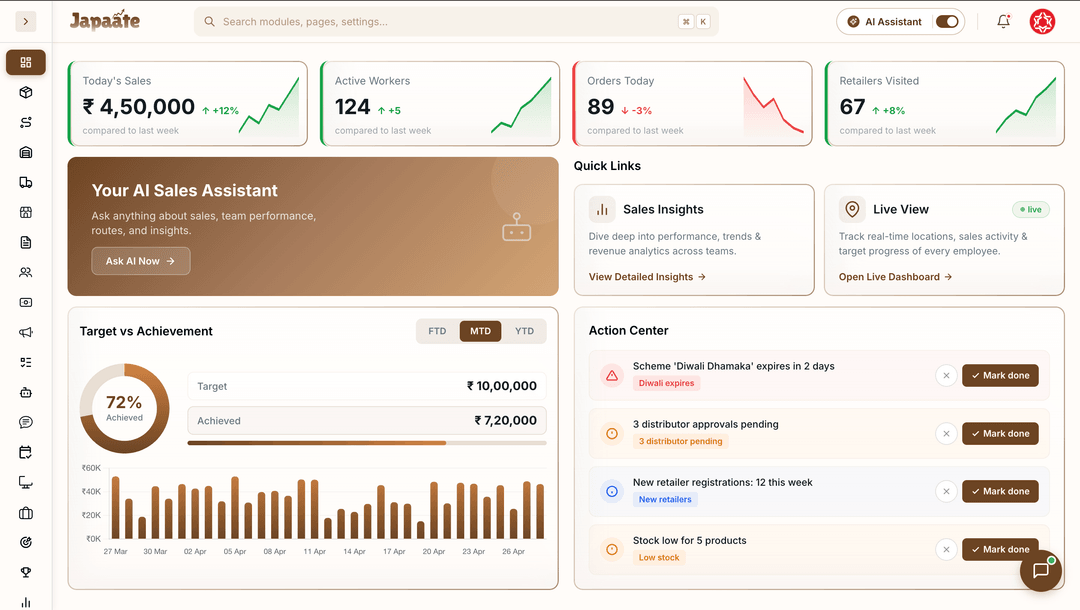
Sales, orders, visits and coverage as they happen, not at month-end.
Reps, retailers and distributors on one map, with drill-down from national head to a single rep.
NSM, ZSM, RSM, ASM, SO and SR, each seeing exactly what their role allows.
AI splits the company target down to zones, regions, areas and routes, adjusting for festivals and seasons.
Who is on track and who is at risk, before the month is lost.
Ask about your sales in plain language, typed or spoken, and export the answer to Excel.
Create a scheme once and every app applies it on every order.
Expense claims and payroll sit next to the activity that earned them.
Last week's sales, orders and coverage are already there.
"Which areas are behind target this month?" Japaate AI answers with a table.
Open the area on the live map, then a rep's visit timeline, selfies included.
Adjust targets in Targets Atlas while there is still time to recover the month.
All four products share one live set of data, so an order, a scheme or a payment updates everywhere at once. Start with one and add the rest when you're ready.
The Japaate Admin Panel is the browser-based command centre for sales leadership: live KPIs, a live field map, targets and scorecards, KPIs and rewards, and an AI sales assistant.
You can ask about your sales, orders, targets and distributors in plain language, typed or spoken, for example which areas are behind target this month. Answers come back as tables you can export to Excel.
Yes, in three places. Managers can ask the AI assistant in the Admin Panel about their sales in plain language, typed or spoken, and export the answer to Excel. Targets Atlas uses AI to split a company target down to every route. And the Salesman and Retailer apps suggest products for each store's cart based on what sells. See the AI assistant.
Targets Atlas uses AI to split the company target across zones, regions, areas and routes, adjusting for festivals and seasons. A sales scorecard then shows who is on track and who is at risk.
Yes. The Admin Panel shows reps, retailers and distributors on one live map. You can drill down through the sales hierarchy, from national head to a single salesman, and see each rep's visits on a timeline.
Yes. Japaate is role-aware: every user sees what their role allows, across a sales hierarchy up to six levels deep. Field reps see actions; leaders see insight across their territory.
A CRM records your customers. A sales intelligence platform tells you where sales are being won and lost. Here is the difference, and why it matters in FMCG.
16 October 2026 · 7 min read
Most sales questions are simple to ask and slow to answer. Here is what a useful AI assistant does, what it must never do, and how to judge one.
16 October 2026 · 2 min read
Most sales systems are slow because the same order is typed three times. A seven-step framework to find the bottleneck and fix it.
16 October 2026 · 7 min read
A 30-minute demo, set up around how your team sells today.